
Adapt an Instrument
Choosing Adapt the instrument to a new course creates a new instrument, using the current instrument as a template. This is the same thing as reusing an instrument. (The current instrument is not affected.) Once the new instrument is created, you will have to enter the course information, set the start and end dates, and announce the survey to the students (it will have a new instrument ID). You may also choose to edit the questions of this new instrument if you wish.
Choosing Edit the instrument allows you to make changes to the current instrument, changes such as adding, deleting or modifying questions. You can only choose this option on an open instrument. (An instrument is open until the start date for the survey is reached.)
Advanced Search
The Advanced Search lets you more precisely define which instruments you wish to view. Only instruments that match all of the criteria you specify will be displayed.
For example, if you enter "Chemistry" (without the quotes) in the Course field and "University of Wisconsin" in the Institution field, then you may see instruments from the Chemistry departments of University of Wisconsin—Madison, University of Wisconsin—Milwaukee, etc.
See also: Search
Course password
Each instrument can have an optional course password to prevent unauthorized people from responding to the instrument. This is most useful for anonymous instruments, rather than authenticated instruments.
Course size
Each instrument can have an optional course size that represents the expected number of student responses. This number is used in statistical analyses of the student responses. If this field is left blank, or is less than the actual number of student responses, it becomes:
- The number of entries in the student list, in the case of authenticated instruments
- The actual number of student responses, otherwise
This field can be edited at any time, even after the instrument is completed.
Cross-tabulation/Disaggregation
This is the practice of comparing the results of one question against another question. The two questions can be from the same administration of an instrument, or from any two instruments (differentiated perhaps longitudinally, geographically or sectionally).
In some cases, we do not show all of the responses where that would pierce the veil of privacy due to small numbers of responses.
Department affiliation
If an instructor's home page indicates a department affiliation, that means that a departmental user has provided that instructor's email address on their faculty list. This affiliation grants the instructor access to departmental templates that the instructor can incorporate into any instrument. If the instructor opts in by using one of those templates, s/he automatically grants the department the ability to view the results of those questions included in the departmental template.
Department Privileges
The Department area of the SALG website allows a department head to delegate responsibilities to others. The following privileges may be granted to instructors:
- Administrator
- This instructor has all of the powers of the department user, except changing the department passwoord, editing the instructor list, or uploading student data. This privilege is a superset of the privileges below.
- Creator
- This instructor can create, edit and delete department templates and instruments.
- Analyzer
- This instructor can view the responses to any instrument which is derived directly from a department instrument or template. However, the analyzer can only see responses to questions that are marked as department questions.
"D" — Department question
The Department section of the SALG website allows department heads to create templates with "locked" questions to collect common data (usually about common learning objectives) from multiple courses. Once the department head has created a template, s/he can make that template available to faculty by adding faculty email addresses to the department SALG page. (In this case, the department name will appear under Department affiliation on the user's home page.) If an instructor chooses to create an instrument starting from a department template, the questions "locked" by the department head will have a "D" next to them. These D-questions cannot be deleted or edited by the instructor. Once the survey is complete, the department head will be able to view the results of the D-questions (and only the results of the D-questions).
Description
This description will be the primary identifier for your course on all lists and search functions. If you choose to make your instrument public, it will be the primary way other instructors learn about your SALG. Students will never see this description.
This field can be edited at any time, even after your survey is closed.
Guests
Visitors may sign into the site via the 'Try it out' link to experiment with the capabilities of SALG before registering their own name. The Guest account is a lightly-restricted version of a regular account.
Instrument
An instrument is the SALG survey as seen by student recipients. The instrument life cycle is divided into four phases:
Editing
The instructor has not yet set an open/close date for the instrument. This instrument needs more work before it is ready to be used in a class.
Scheduled
The instrument is ready to be used in a class. The open and close dates are in the future. The instrument can still be edited.
In progress
The instrument is being administered to a class. The open date is in the past and the close date is in the future. The instrument cannot be editied.
Completed
The instrument has been administered to a class. The close date is in the past. Completed instruments are further categorized as "public", "anonymous" or "private". Public and anonymous completed instruments appear in the list of all instruments. Public instruments show the instructor's name while anonymous ones do not.
Public/Private Instruments
Instruments can be public, anonymous or private:
Public
Anyone can see this instrument via the Search feature. Others may duplicate the questions of this instrument to create their own.
Anonymous
Same as Public, except the identifying Instructor Name is removed from the search results.
Private
The instrument will not appear in the search results.
Default
Unless specified otherwise, an instrument starts out as Private and changes to Public after it has been completely administered (that is, when the close date arrives). If the instructor specified Public, Anonymous or Private explicitly, then no change occurs when the close date arrives.
Question Types
Instruments are allowed to have four different types of questions:
Scale
The question has a set of options selected by the student. This type of question can be: a) nominal, or un-ordered (e.g., "Yes", "No"); b) ordinal, or ordered ("a lot", "a little", "not at all"). Instructors can use existing scales provided on the SALG site, or can create their own.
Long answer
A multi-line free response. The response is limited to about 2000 characters. Any printable characters are allowed in the response, including foreign characters.
Group
A heading question or statement. This type is rhetorical, serving only to organize sub-questions.
Search
The Search box lets you narrow the list of all instruments.
For example, if you wish to see only instruments that apply to Chemistry classes, type "chemistry" and press Return. Then, only instruments that have the word "chemistry" in one of their descriptive fields will be displayed. For more specific searching, like displaying instruments which have "chemistry" in their Course field, see the Advanced Search.
Reuse/Adapt an Instrument
Choosing Reuse/adapt creates a new instrument, using the instrument on this line as a template. (The instrument on this line will not be affected.) Once the new instrument is created, you will have to enter the course information, set the start and end dates, and announce the survey to the students (it will have a new instrument ID). You may also choose to edit the questions of this new instrument if you wish.
Statistics
The analysis tools of the SALG site report the following statistical results:
Mean
The mean is the average choice value among the responses. The calculation only applies to ordinal choices, not nominal choices.
Mode
The mode is the most popular choice value among the responses, excluding "not applicable" values.
N
N is the number of responses, excluding any "not applicable" values.
Standard Deviation
If the results are ordinal, we report the sample standard deviation which is measure of the spread of the result values.
The standard formulation differs from the pure standard deviation in that it uses N-1 instead of N to normalize. The SALG software employs a formula that is equivalent to the following:
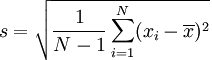
We omit any "not applicable" results from the calculation. See also:Wikipedia's Standard Deviation entry
Student identity
An instructor has three choices for student identification. For each choice, students always enter their email address. However, the choices differ in access to those email addresses.
Authenticated
The instructor will provide a list of student email addresses and only those students can participate. The instructor can tell which students have responded to the instrument, but will not be able to tell which responses are tied to which student email address
Non-anonymous
Access to the instrument is not controlled by an email list, but the instructor can see which email addresses have responded, just like in the Authenticated case.
Anonymous
The instructor never sees any student email addresses and can only tell how many students responded, not which ones.